Help with formatting JSON output from queries into html ms teams message

Hi all,

I was wanting to create workflows that are triggered from MS teams messages that automate hunting for an IOC.

The process would be analyst issues a command - e.g. !hunt 8.8.8.8 and then the workflow will query different logs inside r7 and other tools (e.g. cortex edr) and return summarised results.

Example being an external IP is found to be of interest, we can add to community threat \ detection rule to know about any future activity but then will want to hunt back and find hosts that interreacted with that IP. Log sources would include firewall, DNS lookups that resolved to that IP, web proxy logs etc etc.

I’ve got a workflow triggering on a ms teams message, it does a LEQL to r7 successfully but im struggling on how to present the information back in a table or otherwise easy to read format.

An example query against the firewall logs looks like: where(“destination_address” = {{[“IP Loop”].[$item]}}) groupby(“asset”)

The loop is if there are multiple IPs added to the trigger it loops through all of them.
E.g. !hunt-ioc 8.8.8.8 1.1.1.1

I can see the output from the query the results live under statistics - groups but im not sure how to extract this. I’ve tried some ai suggestions looping through it with the “jq” plugin but i’m quite lacking in json knowledge.

I’ve had a hunt through the workflows at extensions.r7 and cant see anything there I could adapt. Is anyone able to point me in the right direction please ? Open to any solution.

Thanks in advance!
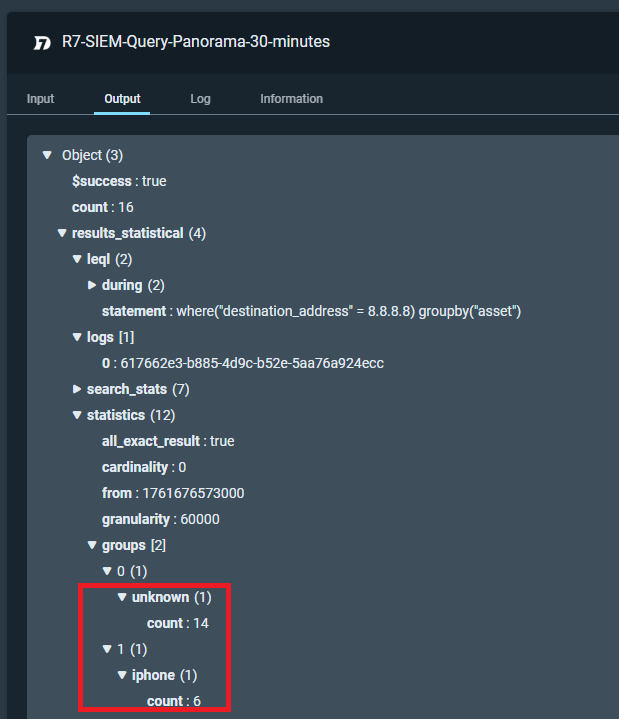
There are a few different ways you can accomplish this, but it really depends on what the results will contain, what you will do with those results.

JQ is one option. Here is an example of how to do it and the data set I passed into JQ:

{
  "$success": true,
  "count": 44,
  "results_statistical": {
    "leql": {
      "during": {
        "from": 1761684095000,
        "to": 1761685895000
      },
      "statement": "groupby(\"event.EventData.Data.class\")"
    },
    "logs": [
      "e823a92c-54a1-48a2-83d9-77489f74667b"
    ],
    "search_stats": {
      "bytes_all": 86814,
      "bytes_checked": 86814,
      "duration_ms": 44,
      "events_all": 45,
      "events_checked": 45,
      "events_matched": 44,
      "index_factor": 0
    },
    "statistics": {
      "all_exact_result": true,
      "cardinality": 0,
      "from": 1761684095000,
      "granularity": 180000,
      "groups": [
        {
          "NetworkConnectionEventData": {
            "count": 36
          }
        },
        {
          "ProcessAccessEventData": {
            "count": 8
          }
        }
      ],
      "groups_timeseries": [
        {
          "NetworkConnectionEventData": {
            "groups_timeseries": [],
            "series": [
              {
                "count": 5
              },
              {
                "count": 4
              },
              {
                "count": 4
              },
              {
                "count": 3
              },
              {
                "count": 3
              },
              {
                "count": 4
              },
              {
                "count": 3
              },
              {
                "count": 3
              },
              {
                "count": 4
              },
              {
                "count": 3
              }
            ],
            "totals": {
              "count": 36
            }
          }
        },
        {
          "ProcessAccessEventData": {
            "groups_timeseries": [],
            "series": [
              {
                "count": 1
              },
              {
                "count": 7
              },
              {
                "count": 0
              },
              {
                "count": 0
              },
              {
                "count": 0
              },
              {
                "count": 0
              },
              {
                "count": 0
              },
              {
                "count": 0
              },
              {
                "count": 0
              },
              {
                "count": 0
              }
            ],
            "totals": {
              "count": 8
            }
          }
        }
      ],
      "others": {
        "series": []
      },
      "stats": {},
      "status": 200,
      "timeseries": {},
      "to": 1761685895000,
      "type": "count"
    }
  }
}

So if I want to target groups just like you are this would be my JQ statement.

{ groups: [ .results_statistical.statistics.groups[] | to_entries[] | { name: .key, count: .value.count } ] }

I’ve attached the snippet for you to view. You need to change your query and the log ID.
Get Logs.snpt (4.2 KB)

You could also use the Python plugin to do the same thing.

If you wanted you could loop over the groups array as well. That would give you access to the data within groups.

It really depends on your overall goal. JQ is a great plugin to get comfortable with, though. It’s best to ensure your output is formatted as an object. This way, you can pass the JQ output directly into the Type Converter plugin and use the string to object step.

JQ always outputs a string, regardless of what you do, but if you structure the result as an object, the Type Converter will properly convert it and make the variables usable throughout your workflow. All of that is demonstrated in the snippet I shared with you earlier.

1 Like

Awesome thank you so much!

Will give this a look.