Hi Petar,
Apologies for the delay responding to your query.
The Directory List job can certainly collect information for multiple files/directories at once.
Looking at the errors you are getting suggests the path argument is wrong. To be fair, it looks like our documentation is misleading which we will take that one internally to get reviewed and fixed as soon as possible.
For now, here are the arguments you should use:
- Path: [required] - the list of files/directories to search for/acquire - this may be provided in the form of a relative path to a file, an absolute path, a regular expression, or glob (e.g C:\Temp, C:\Windows\Sys*)
- File Name patterns: [optional] default of None - a set of filename patterns to use when searching for files (e.g *.dll, agent.exe, *.exe, .)
- Depth: [optional] - the maximum recursion depth to use when searching for files (e.g. only look 3 directories down when looking at for instance C:\Windows)
- Max File: [optional] default of None - the maximum file size in MB (i.e. ignore any files with a file size which is greater than this)
- Min File: [optional] default of None - the minimum file size in MB (i.e. ignore any files with a file size which is lower than this)
- ZIP On/Raw: [optional] default of False - If true, Zip On will compress the uploaded acquired file for storage on the backend (AWS S3 I believe), Raw I believe will turn a special raw file acquisition job and it currently doesn’t have support for multiple files collection therefore only works on a single file at a time.
- MD5 On/SHA1 On: [optional] default of False - If true, will calculate hashes digest for all discovered files
Now here is an example I ran in my lab to discover all files under C:\Temp with recursive depth of 2 and generating MD5 digest for all files:

The output:
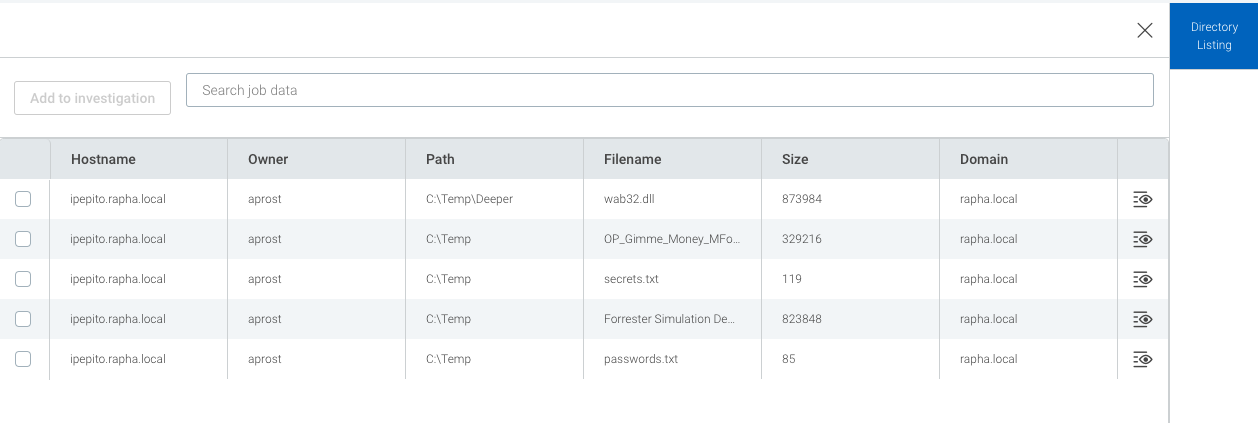
Please allow at least 5min to get the result showing in the UI. All dependent on internet bandwidth/listing criteria. Use it carefully as doing an extensive directory listing such as everything under C:\ will eventually fail. You might get some initial results but after that the job will fail. I believe there is some kind of job rate limit which I don’t more information about at this stage.
Again, sorry for the tardive response and hope you find this useful.
Thanks,
Oli